 PAA Practice Exams
 / Exam guide / Section 4
Section 4: Evaluating and deploying agentic workflows
Section 4 is about 22% of the exam and lists seven considerations: four under 4.1 (evaluation) and three under 4.2 (deployment and scaling). Most questions turn on three choices: which evaluation tool and metric fits the data you have (reference answer or rubrics, LLM judge or deterministic, offline evalset or online monitor), whether the agent belongs on Agent Runtime, a Cloud Run resource type or GKE, and which setting or observability view fixes a production symptom such as drift, slow tools or a reasoning loop.
| Share of the exam | About 22%, roughly 11 questions if the GA exam has 50 |
| Practice questions | 9 free on this page and in the practice exam, 40 in the full bank |
The 7 Section 4 considerations, as worded in the official exam guide
4.1 Evaluating agents in development and in production
- Creating test sets for agent evaluation (e.g., golden data, prompts, and edge cases)
- Creating continuous evaluation pipelines to assess an agent's tool execution based on established success criteria
- Determining the appropriate evaluation framework and tooling (e.g., ADK evaluation tooling (evalset), Agent Platform Gen AI evaluation service, and custom autoraters)
- Evaluating an agentic system against a golden dataset to assess agent response and retrieval quality (e.g., using ADK)
4.2 Deploying and scaling production workloads
- Selecting optimal deployment runtime based on the use case, requirements, and cost (e.g., Agent Runtime, Cloud Run, and GKE)
- Troubleshooting agent issues (e.g., drift, tool invocation latency, agent reasoning loops, and system failures)
- Monitoring and optimizing agents for performance, reliability, and cost (e.g., identify logic errors, latency bottlenecks, and hallucinations)
Source: Professional Agentic Architect exam guide (PDF).
Building agent test sets: test files, evalsets, simulated users and injected tool failures
.test.jsontest file: one session (which can have several turns), meant for fast unit-style checks during active development. Run it withpytestthroughAgentEvaluator.evaluate. A folder of test files can carry atest_config.jsonwith the criteria.- Evalset file: many sessions, possibly long, suited to integration tests that run less often. Each eval case holds user queries, expected tool use, expected intermediate responses, a reference response and an initial session state. Run it with
adk eval. adk webEval tab: saves the current session, including its tool trajectory, as an eval case in the EvalSet schema. You can then edit agent text responses or delete messages. This is the lowest-effort way for domain experts to turn validated conversations into golden data.- User simulation: a
ConversationScenarioholds a starting prompt and a conversation plan, and an LLM writes each next user turn. The case stays valid when the agent asks for details in a different order. Pre-built personas includeNOVICE. Scenarios have no expected responses, so score them with criteria that support user simulation (rubric-based ormulti_turn_*). - Environment simulation: intercepts named tool calls through a
before_tool_callbackor a plugin and returns controlled responses. AnInjectionConfigcan return an injected error such as HTTP 503 and addinjected_latency_seconds. Use it for outage and slow-backend edge cases without test-only code in the agent. - Console route: on the Agent Platform Evaluation page, New evaluation > Simulate sessions generates multi-turn cases from a generation instruction into an editable table. It needs an agent version in Agent Registry and no code.
- Recordings and
adk conformance: Replay mode (the default) compares live model requests, responses and tool calls against recorded interactions. These are regression baselines, not editable golden cases.
Sources: ADK evaluation, ADK user simulation, ADK environment simulation.
ADK evalset, Gen AI evaluation service or a custom autorater: which evaluation tooling fits the scenario
| If the scenario says | Choose | Why |
|---|---|---|
| Developers test an ADK agent locally or in CI against expected tool calls and reference answers | ADK evalset or test file with tool_trajectory_avg_score and response_match_score | These are the defaults when no criteria are set (thresholds 1.0 and 0.8). Neither uses an LLM judge. |
| Golden answers exist, but correct answers are worded differently | ADK final_response_match_v2, or FINAL_RESPONSE_MATCH with a reference column in the Gen AI evaluation service | An LLM judge decides semantic equivalence. ADK takes a judge model and num_samples for majority voting. |
| No single correct answer, but written rules every reply must follow | ADK rubric_based_final_response_quality_v1 or rubric_based_tool_use_quality_v1; Gen AI FINAL_RESPONSE_REFERENCE_FREE | Yes or no verdict per rubric. Rubrics can be added per case through EvalCase.rubrics. FINAL_RESPONSE_REFERENCE_FREE requires rubric_groups. |
| Logged prompts, responses and tool calls exist, and the agent must not run again | Gen AI evaluation service: dataset with prompt, response, intermediate_events, then evaluate() without run_inference() | run_inference() executes the agent again. |
| Broad quality scoring without hand-written rubrics | GENERAL_QUALITY (optional guidelines), FINAL_RESPONSE_QUALITY, TOOL_USE_QUALITY, HALLUCINATION | Adaptive rubrics are generated per prompt, then validated. |
| One judging prompt with its own scale, shared by many teams in experiments and online monitors | Custom autorater: LLMMetric registered in the Metric Registry with client.evals.create_evaluation_metric | One version-controlled definition instead of copies in notebooks. |
| Deterministic structural check (valid JSON, schema match) with no judge cost | Custom code metric: custom_function locally or remote_custom_function | The remote evaluate(instance) function returns a float and runs in a sandbox with no network, a 1-minute limit and jsonschema available. |
Sources: ADK evaluation criteria, Define your evaluation metrics, Rubric metric details.
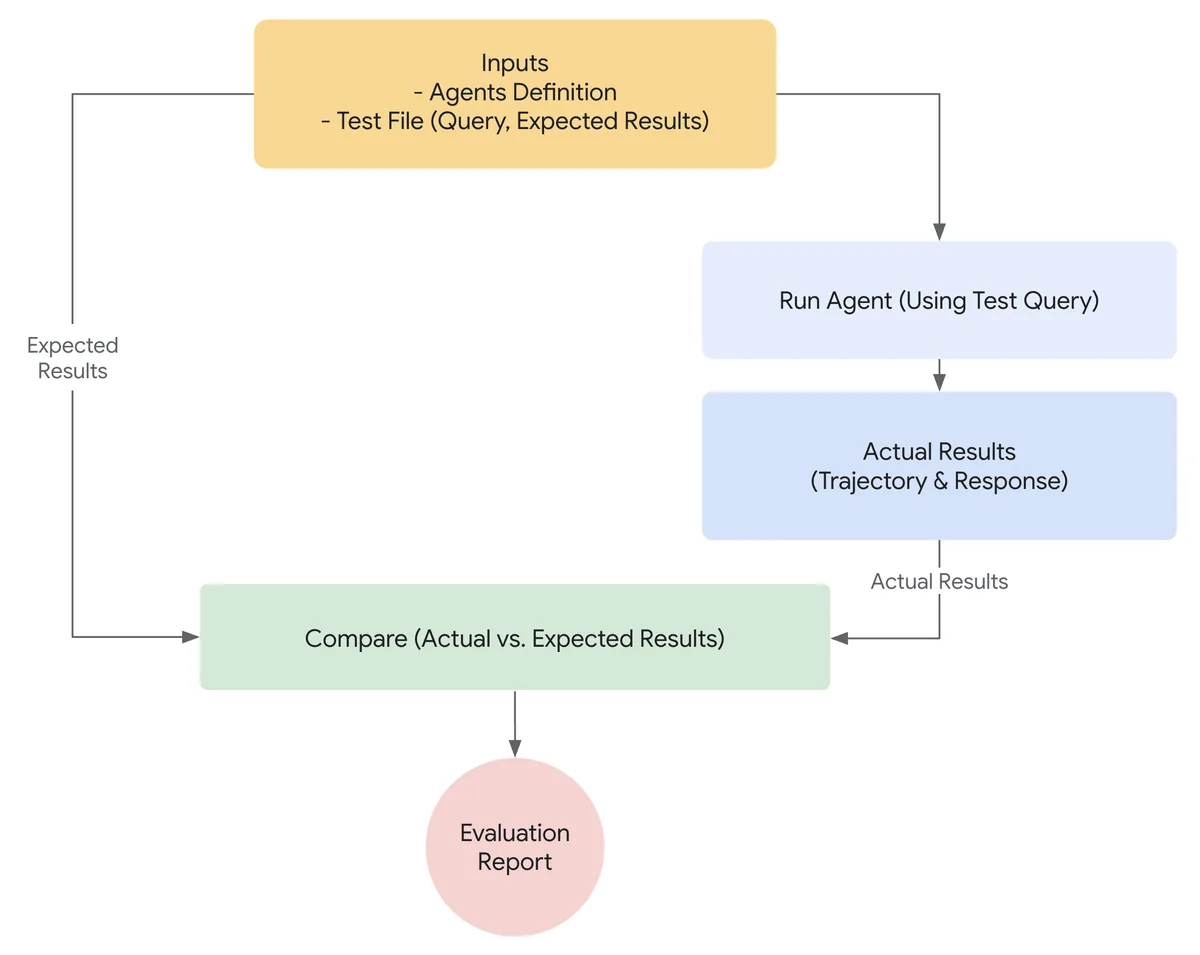
Evaluation criteria that look alike, and retrieval quality versus answer quality
response_match_scorevsfinal_response_match_v2: ROUGE-1 word overlap versus an LLM judge of semantic equivalence. Lowering the ROUGE threshold also lets wrong answers that share words pass.tool_trajectory_avg_scorematch types:EXACT(default) fails on any extra or missing call.IN_ORDERrequires the expected calls in sequence and allows other calls between them.ANY_ORDERignores sequence. Set the type withmatch_typenext tothreshold.- ADK
hallucinations_v1vs Gen AIGROUNDING:hallucinations_v1labels each sentence against the context, including tool calls and results. It checks only the final response unlessevaluate_intermediate_nl_responsesis true, which also covers sub-agent text.GROUNDINGis a static rubric metric that checks a response against the source text you supply incontext. SAFETY/safety_v1vs grounding: safety looks for hate speech, harassment and dangerous content. It does not test factual support.multi_turn_task_success_v1vsmulti_turn_trajectory_quality_v1: whether the conversation goals were met versus how efficient and logical the path was.- Efficiency criteria (
tool_call_count_v1,inference_call_count_v1,token_usage_v1,invocation_duration_v1) vs quality criteria: efficiency criteria are always reported, never pass or fail a case, and a threshold on them is rejected as an error. Compare them between baseline and candidate runs. - Retrieval quality vs answer quality: for an Agent Search (formerly Vertex AI Search) custom search app, search-quality evaluation runs a sample query set that lists target document URIs, optionally with page numbers. It returns
docRecall,docPrecisionanddocNdcg, pluspageRecallandpageNdcgwhen pages are given and extractive answers are on, at several top-k cutoffs. Answer metrics and tool trajectories do not measure document ranking.
Sources: ADK evaluation criteria, Rubric metric details, Evaluate search quality.
Continuous evaluation: merge gates with ADK and Agents CLI, online monitors after launch
Before merge, use deterministic gates.
- ADK:
tool_trajectory_avg_scorewithIN_ORDERand threshold 1.0 intest_config.json, run bypytest. ADK recommends trajectory matching for CI/CD regression because it uses no LLM judge. - Agents CLI: set a minimum mean score per metric under
thresholdsineval_config.yaml.agents-cli eval runandeval gradeexit with code 1 when a metric misses its threshold, so the build fails on the exit code.eval comparediffs two runs;eval analyze(experimental) clusters failure themes.
After launch, use online monitors (Agent Platform > Agents > Evaluation > Online monitors).
- Loop, typically every 10 minutes: sample traces from Cloud Trace and Cloud Logging, score them with the Gen AI evaluation service, write results to Cloud Logging and numeric scores to Cloud Monitoring, where an alerting policy can notify on-call.
- Cost controls: Sampling percentage, Max samples per run, and filters such as
Durationor token usage. - Telemetry required: an invoke agent span with
gen_ai.agent.name,gen_ai.agent.description,gen_ai.conversation.id, and an inference event withgen_ai.input.messages,gen_ai.output.messages,gen_ai.system_instructions,gen_ai.tool.definitions. For ADK setOTEL_SEMCONV_STABILITY_OPT_IN='gen_ai_latest_experimental'andOTEL_INSTRUMENTATION_GENAI_CAPTURE_MESSAGE_CONTENT='EVENT_ONLY'. An empty dashboard means checking forgen_ai.attributes first, then filters with Initial Inspection, then monitor logs. - Monitors run as the project-level service agent (P4SA), and anyone who can create an
OnlineEvaluatorcan attach it to any agent in the project. Restrict creation to administrators. - Store multimodal inputs and outputs in Cloud Storage, not inside trace spans.
- To group many rubric failures, Automatic Loss Analysis (
generate_loss_clustersor the report's Failure Clusters section) classifies them into patterns such as Hallucination of Action.
Sources: Online monitors, Agents CLI evaluation, View evaluation results.
Agent Runtime, Cloud Run or GKE: which runtime the scenario asks for
| If the scenario says | Choose | Why |
|---|---|---|
| Least operational overhead, ADK agent, managed sessions and Memory Bank, no container skills | Agent Runtime (formerly Agent Engine) | Fully managed and autoscaling, supports VPC Service Controls, and has full ADK integration through the adk CLI. |
Agent in another language or framework, already a container, must work with the console playground and SDK query/stream_query | Agent Runtime custom container | Runtime contract: listen on 0.0.0.0:8080, implement /api/reasoning_engine and /api/stream_reasoning_engine, declare methods in classMethods. |
| Agent Runtime must reach a private VPC or on-premises system | psc_interface_config with a network attachment, plus DNS peering | Agent Runtime runs in a Google-managed network. Serverless VPC Access and Direct VPC egress are Cloud Run features. |
| Request-driven HTTP agent, variable traffic, scale to zero, any framework | Cloud Run service | Supports streaming HTTP responses and WebSockets. |
| Consume Pub/Sub or Kafka tasks, no HTTP endpoint, scale with backlog | Cloud Run worker pools | Background agent fleets that scale horizontally without public endpoints. |
| Run-to-completion work such as batch evaluations or ingestion | Cloud Run jobs | Jobs run to completion. |
| Always-on, stateful singleton agent loop | Cloud Run instances | VM-like lifecycle for one dedicated loop. |
| Self-hosted fine-tuned model on a GPU, bursty traffic, lowest cost | Cloud Run GPU service, min instances 0, GPU zonal redundancy off | GPUs require instance-based billing but can still scale to zero. Idle minimum instances with GPUs are billed at the full rate. |
| Open models on infrastructure the platform team controls, agent and model scaled separately | GKE: agent on a CPU node pool, vLLM on a GPU node pool | GKE gives more deployment control and runs open models. Agent Runtime resource_limits accept only cpu and memory. |
Sources: Agent Runtime overview, AI agents on Cloud Run, ADK deployment options.
Agent Runtime and ADK deployment settings that fix cold starts, queuing, lost state and bad releases
min_instances: range 0 to 75, default 1. A burst with no idle instance causes a cold start; set it to cover baseline peak load. In the documented test, 300 concurrent requests averaged about 4.7 seconds cold and 0.4 seconds warm. Raisingmax_instancesdoes not remove cold starts.max_instances: range 1 to 1,000, default 100; limited to 1 to 100 when VPC Service Controls or a PSC interface is enabled.container_concurrency: default 9, recommended2 * cpu + 1. Each container runs 9 agent processes. The default suits synchronous code; for asynchronous ADK agents start at a multiple of 9, such as 36. In the documented test this cut maximum latency from 60 to about 7 seconds. Values too high risk out-of-memory errors.resource_limits: onlycpu(1, 2, 4, 6 or 8) andmemory(1Gi to 32Gi); default{"cpu": "4", "memory": "4Gi"}. More CPU does not help I/O-bound agents.- Revisions: each update to versioned fields such as environment variables creates an immutable revision. A manual traffic split sends integer percentages to active revisions, so rollback is 100% to the previous revision and a canary is a small share to the new one. Archived revisions cannot be restored.
- The API resource is still named
ReasoningEngine. - ADK on Cloud Run: without
--session_service_uriand--artifact_service_uri,adk deploy cloud_runuses in-memory services and loses sessions and files when an instance is recycled. Useagentengine://AGENT_IDfor managed sessions andgs://BUCKETfor artifacts.
Sources: Deploy an agent, Optimize and scale, Manage revisions and traffic.
Troubleshooting drift, tool latency, reasoning loops and failures: symptom, where to look, fix
| Symptom | Where to look | Fix |
|---|---|---|
| Quality declines over weeks as users and data change (drift) | Evaluation view of the agent's Observability tab, Cloud Monitoring | Online monitor with sampling and an alerting policy. A fixed launch evalset does not contain the new traffic. |
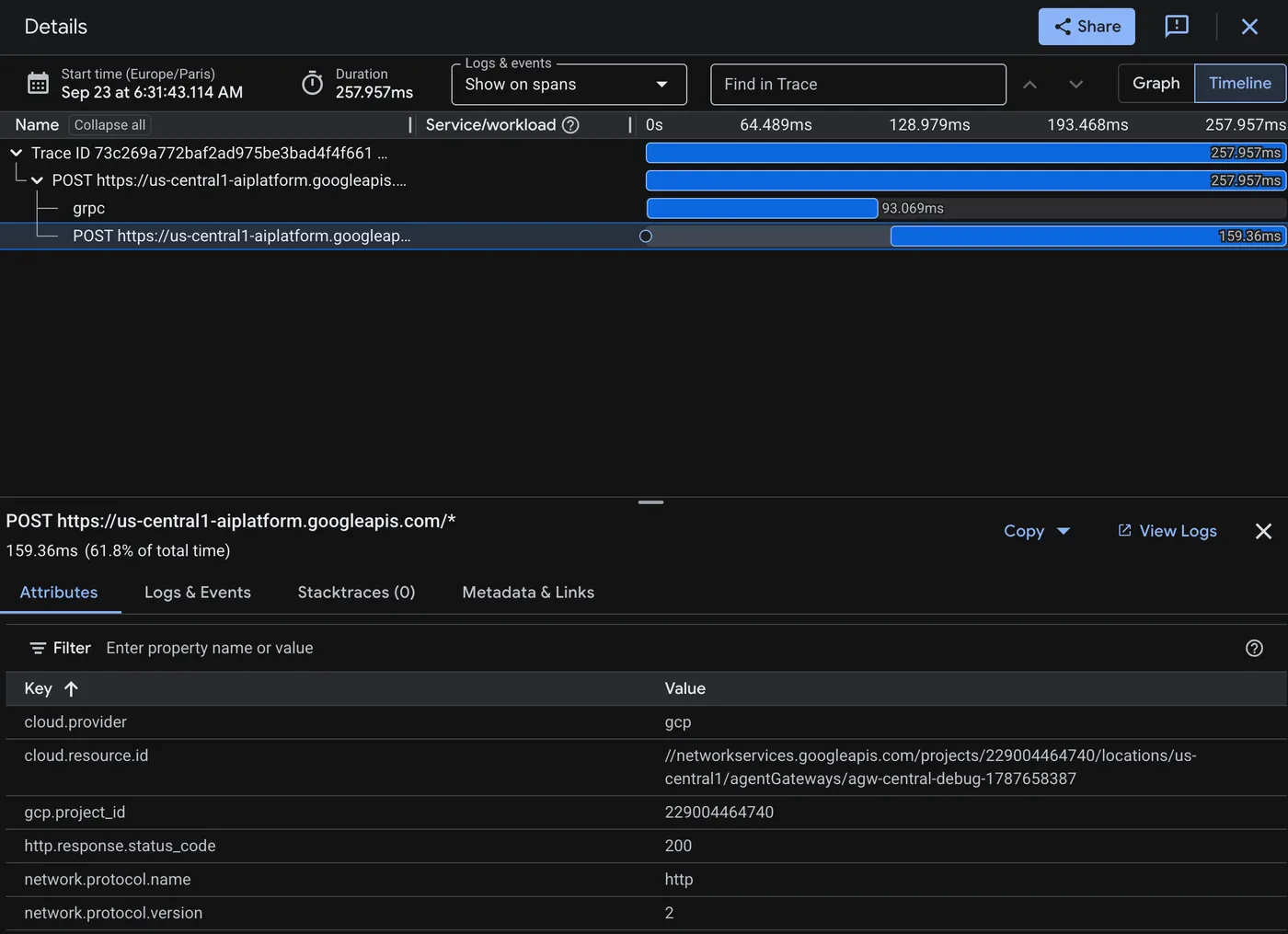
| p99 latency rose, cause unknown | Tools view (p95 latency, calls, errors per tool), Models view, then slow traces in the Traces tab | Fix the long span. Whole-request latency metrics do not split time by tool. |
| Independent tools in one turn run one after another | Sequential tool spans in Cloud Trace | Rewrite them as async def with async clients; ADK for Python runs async tools in parallel since v1.10.0. |
| Runaway runs with hundreds of model calls | Traces, inference_call_count_v1 | max_llm_calls in RunConfig just above normal need. Default is 500; 0 or less means unlimited. |
LoopAgent never finishes | Session traces | Set max_iterations and give a sub-agent a tool that sets tool_context.actions.escalate = True. |
| Transient tool failures | Tools view error rate | ReflectAndRetryToolPlugin with max_retries. Errors returned inside successful results need an extract_error_from_result override. |
| Hallucinated answers, but traces show no prompts or responses | Cloud Trace span content | GOOGLE_CLOUD_AGENT_ENGINE_ENABLE_TELEMETRY omits content. Add OTEL_INSTRUMENTATION_GENAI_CAPTURE_MESSAGE_CONTENT=EVENT_ONLY and the semconv opt-in. |
| Wrong tool choices across millions of sessions, joined with business data | BigQuery | BigQuery Agent Analytics plugin; writes asynchronously through the Storage Write API. |
| Token cost and latency grow with session length | Models view token usage | ContextCacheConfig on the App for large repeated instructions; EventsCompactionConfig to summarize older events. |
| Tool error rate spikes after a release | Tools view | Traffic split: 100% to the previous revision. |
Sources: Agent observability, ADK RunConfig, Trace an agent.
9 free Section 4 questions with answers
The first answer is open as an example. In the practice exam you answer them one by one and get a score for this section; the full bank has 40 Section 4 questions.
Question 1, 4.1 Evaluating agents in development and in production
A telecom company is building a plan-change agent with Agent Development Kit (ADK). The agent needs a customer's account number and the target plan before it calls its change_plan tool, but depending on the conversation it may ask for them together or one at a time. The team has no production traffic yet and found that scripted multi-turn test cases break whenever the agent asks its questions in a different order. They want multi-turn test cases that stay valid regardless of question order and that also reflect less technical customers. What should you do?
- Record several sessions in the adk web Eval tab, save each as an eval case, and set tool_trajectory_avg_score with the EXACT match type.
- Write .test.json files that list every expected user turn and the expected change_plan arguments, and run them with pytest in CI.
- Add ConversationScenario eval cases with a starting prompt, conversation plan, and NOVICE persona, scored with reference-free criteria.
- Wait for launch, sample production logs into a dataset, and score the sampled sessions with response_match_score against the logged replies.
Show the answer and explanation
Answer: C. ADK user simulation replaces fixed user prompts with a ConversationScenario: a fixed starting prompt plus a conversation plan that an LLM uses to generate each next user turn, so the test adapts when the agent asks for values in a different order. The pre-built NOVICE persona models a goal-oriented, conversational user who waits to be asked for details. Because scenarios have no expected responses, they must be paired with criteria that support user simulation, such as rubric-based or multi_turn_* criteria.
Why the other options are wrong:
- A. Recorded sessions replay fixed user turns, so they still break when the agent changes its question order, and EXACT trajectory matching makes each case even more brittle.
- B. Fully scripted turns are exactly the brittle approach that fails when the agent changes its question order.
- D. There is no production traffic yet, and ROUGE-1 matching against logged replies does not test how the conversation adapts.
Official reference: adk.dev/evaluate/user-sim
Question 2, 4.1 Evaluating agents in development and in production
A travel company has built a booking agent, and an immutable version of it is already registered in Agent Registry. The agent has not launched, so no production traces exist. The QA analysts who own test design work only in the Google Cloud console and do not write Python or use command-line tools. They need a starting set of multi-turn test cases in which users begin booking a flight and then change their minds, and they want to review and edit the cases before running them. What should they do?
- Ask a developer to run agents-cli eval dataset synthesize locally with an instruction, and then share the generated trace files with the QA team.
- On the Agent Platform Evaluation page, select New evaluation > Simulate sessions, enter a generation instruction, and edit the generated table.
- Create an online monitor that evaluates the agent's traces, and copy the lowest-scoring sessions into a dataset once enough traffic arrives.
- Write ConversationScenario JSON files by hand, and add them with adk eval_set add_eval_case using a session input file for the agent.
Show the answer and explanation
Answer: B. Agent Platform agent evaluation can generate scenarios in the console: New evaluation, Simulate sessions, a generation instruction such as a user who changes their mind, and an editable table of generated cases. This requires an agent version in Agent Registry, which already exists, and needs no code, so it fits a console-only QA team.
Why the other options are wrong:
- A. The CLI route depends on a developer and a local ADK Python project, which the console-only QA team cannot run themselves.
- C. Online monitors score production traces, and the agent has no production traffic yet.
- D. Hand-writing JSON and running the ADK CLI requires the coding and command-line work that the analysts cannot do.
Official reference: docs.cloud.google.com/gemini-enterprise-agent-platform/optimize/evaluation/evaluate-simulated
Question 3, 4.1 Evaluating agents in development and in production
A team scaffolded its agent with Agents CLI and runs agents-cli eval run in Cloud Build on every merge request. The team lead has set these success criteria: the mean tool_use_quality score must be at least 0.8, and the team's custom response-length metric must score 1.0. If either criterion is missed, the build must fail automatically without anyone reading reports. Which approach meets these requirements with the LEAST effort?
- Set both minimum scores under thresholds in eval_config.yaml, and let the build fail on the exit code of agents-cli eval run.
- Add a build step that parses the HTML report in artifacts/grade_results and fails the build when either score is too low.
- Run agents-cli eval compare between the last release's results file and the new results file, and fail when any score differs.
- Run agents-cli eval analyze after each run, and fail the build whenever the command returns one or more failure clusters.
Show the answer and explanation
Answer: A. Agents CLI lets you set a minimum mean score for each metric under thresholds in eval_config.yaml. The eval run and eval grade commands print a RESULT verdict and exit with code 1 when any metric misses its threshold, so CI can gate on the exit code with no extra scripting.
Why the other options are wrong:
- B. Parsing the HTML report rebuilds functionality that the threshold settings and exit code already provide.
- C. eval compare shows the differences between two runs for review; it does not check scores against fixed success criteria.
- D. eval analyze is an experimental command that clusters failure themes, and the presence of clusters does not mean a criterion was missed.
Official reference: google.github.io/agents-cli/guide/evaluation
Question 4, 4.1 Evaluating agents in development and in production
An e-commerce agent returns order summaries as JSON that a downstream system parses. The team needs an automated check that each final response is valid JSON and matches a published JSON Schema. The check must give the same result every time and must not add any judge-model charges. Field order and whitespace in the output can differ between runs, even when the content is correct. Which evaluation approach should the team use in the Gen AI evaluation service?
- Register a custom LLM metric whose prompt asks the judge model to confirm that the response is valid JSON that follows the schema.
- Use the INSTRUCTION_FOLLOWING adaptive rubric metric, and include the schema in each prompt so that the generated rubrics check it.
- Use the exact_match computation metric, and compare each response with a reference JSON string prepared for every test case.
- Use a custom code metric with an evaluate function that parses the response and validates it against the schema with jsonschema.
Show the answer and explanation
Answer: D. Custom code metrics run Python logic such as JSON-shape checks, so the result is deterministic, and code-based metrics add no additional evaluation cost. The jsonschema package is available in the remote sandbox for custom functions, whose evaluate(instance) function receives the response and returns a score.
Why the other options are wrong:
- A. An LLM judge incurs judge-model charges and can give inconsistent verdicts on a purely structural check.
- B. Adaptive rubrics are generated and validated by LLMs, which adds cost and cannot guarantee identical results.
- C. Exact match fails when correct JSON differs only in field order or whitespace, so valid responses would be marked wrong.
Official reference: docs.cloud.google.com/gemini-enterprise-agent-platform/models/determine-eval
Question 5, 4.1 Evaluating agents in development and in production
A legal-research agent answers attorneys' questions from retrieved case excerpts. The team has a golden dataset in which every row contains the question, the excerpts that the agent retrieved, the agent's answer, and an answer that an attorney wrote. Correct answers are long-form and are rarely worded the same way as the attorney's answer. The team wants Gen AI evaluation service metrics that show whether each answer stays faithful to the retrieved excerpts and whether it agrees with the attorney's answer. Which two metrics should the team use? (Choose two.)
- GROUNDING, with the retrieved excerpts that the agent used provided in the context field of each row.
- exact_match, with the attorney's answer provided in the reference field of each row.
- FINAL_RESPONSE_MATCH, with the attorney's answer provided in the reference field.
- TEXT_QUALITY, so that fluency and coherence show how closely the answer follows the excerpts.
- SAFETY, so that answers that contradict the retrieved excerpts are flagged as policy violations.
Show the answer and explanation
Answer: A and C. GROUNDING is a static rubric metric that takes prompt, response, and context, and checks that the response is factually consistent with the provided source text, which the documentation describes as crucial for RAG systems. FINAL_RESPONSE_MATCH uses an LLM judge to decide whether the agent's final answer matches the provided reference, so it tolerates the different wording of long-form answers.
Why the other options are wrong:
- B. exact_match requires an identical response, so long-form answers that are correct but worded differently would score 0.
- D. TEXT_QUALITY measures fluency, coherence, and grammar, not faithfulness to the source excerpts.
- E. SAFETY checks responses against safety policies such as hate and harassment or dangerous content, not whether the answer is grounded in the excerpts.
Official reference: docs.cloud.google.com/gemini-enterprise-agent-platform/models/determine-eval
Question 6, 4.2 Deploying and scaling production workloads
A logistics company runs a fleet of document-processing agents. Upstream systems publish shipment documents to Pub/Sub; each agent pulls messages, calls Gemini and internal tools, and writes results to BigQuery. The agents must not expose any HTTP endpoint, must scale horizontally as the message backlog grows, and the platform team has standardized on Cloud Run for container workloads. Which Cloud Run resource type should you use for these agents?
- Cloud Run worker pools that pull from the Pub/Sub subscription and scale horizontally without serving HTTP.
- Cloud Run services that receive Pub/Sub push deliveries, with ingress restricted to internal traffic only.
- Cloud Run jobs triggered every five minutes by Cloud Scheduler to drain the messages waiting in the subscription.
- Cloud Run instances running a single always-on agent loop that pulls and processes every message in sequence.
Show the answer and explanation
Answer: A. Cloud Run worker pools are intended for background, distributed agent fleets that consume tasks from queues such as Pub/Sub or Kafka and scale horizontally without exposing public HTTP endpoints. They match a pull-based, backlog-driven workload that must not serve HTTP.
Why the other options are wrong:
- B. Services are request-driven and must serve HTTP to receive push deliveries, which violates the no-endpoint requirement even with internal-only ingress.
- C. Jobs are for run-to-completion work such as batch evaluations; polling on a schedule adds delay and does not scale continuously with the backlog.
- D. Instances suit a dedicated stateful singleton loop; a single sequential consumer cannot scale horizontally with the backlog.
Official reference: docs.cloud.google.com/run/docs/ai-agents
Question 7, 4.2 Deploying and scaling production workloads
A travel company's ADK agent on Agent Runtime sometimes gets stuck alternating between a flight-search tool and a re-planning step for the same request. Traces show some runs making several hundred model calls before ending, which drives up cost and keeps users waiting for minutes. Normal requests rarely need more than 20 model calls. The team wants runaway runs to stop early without changing normal behavior. What should you do first?
- Raise max_instances so that runaway sessions do not slow down other users while they keep calling the model.
- Set max_llm_calls in RunConfig to 0 so that ADK manages the model-call budget dynamically for each request.
- Set max_llm_calls in RunConfig to a bound near the observed need, such as 30, so runaway runs end early.
- Wrap the agent in a LoopAgent with max_iterations set to 20 so that each tool call counts as one iteration.
Show the answer and explanation
Answer: C. RunConfig max_llm_calls caps the total number of LLM calls in a run; the default is 500, which is why runaway runs reach hundreds of calls. Setting it slightly above normal needs stops reasoning loops early while leaving typical requests unaffected.
Why the other options are wrong:
- A. More instances add capacity but do nothing to stop the loop, so cost per runaway run stays the same or grows.
- B. A value of 0 or less means unlimited calls, which ADK documents as not recommended for production.
- D. A LoopAgent repeats its sub-agents; its iterations count full passes, not tool calls, and adding one does not cap calls inside an LLM agent's own reasoning.
Official reference: adk.dev/runtime/runconfig
Question 8, 4.2 Deploying and scaling production workloads
A telecom company's billing-support agent on Agent Runtime passed offline evaluation at launch. Over two months, customer complaints suggest that response quality is slowly declining as new plan types and new user phrasing appear. The team wants automatic, continuous scoring of a sample of real production conversations with quality and hallucination metrics, while keeping evaluation costs capped. Cloud Trace is already enabled. What should you do?
- Re-run the launch evalset with the ADK evaluation tooling every two months and compare the scores manually.
- Create an online monitor for the agent with those metrics, a sampling percentage, and a max samples per run.
- Create a log-based metric that counts responses containing the word sorry and alert when the count grows.
- Create a Cloud Monitoring alert on request latencies for the ReasoningEngine resource and review the spikes.
Show the answer and explanation
Answer: B. Online monitoring detects quality drift by asynchronously scoring sampled live traces with predefined or custom metrics on a recurring schedule, writing scores to Cloud Logging and Cloud Monitoring and to the agent's Evaluation dashboard. The sampling percentage and max samples per run settings cap evaluation cost.
Why the other options are wrong:
- A. A fixed launch evalset does not contain the new plan types and phrasing from production, and a manual bimonthly run is not continuous.
- C. A keyword count is a weak proxy that cannot measure response quality or hallucinations.
- D. Latency alerts track performance, not answer quality, so they would not reveal a quality drift.
Official reference: docs.cloud.google.com/gemini-enterprise-agent-platform/optimize/evaluation/evaluate-online
Question 9, 4.2 Deploying and scaling production workloads
An ADK-based agent on Agent Runtime runs with min_instances=10 and the default container_concurrency. In a load test with 300 concurrent requests, median latency is about 4 seconds but maximum latency reaches 60 seconds, while CPU and memory use per container stay low. Most of each request's time is spent waiting on Gemini and tool calls. You want the existing instances to absorb traffic spikes. What should you do?
- Increase container_concurrency to a multiple of 9, such as 36, and watch memory for out-of-memory errors.
- Increase resource_limits to 8 CPUs and 16Gi of memory per container and keep container_concurrency at 9.
- Set min_instances to 75, the maximum allowed value, so that no request ever waits for a new instance to start up.
- Convert the agent to a synchronous implementation so that each container processes one request at a time.
Show the answer and explanation
Answer: A. The default container_concurrency is tuned for synchronous code, but ADK agents are asynchronous and can handle many I/O-bound requests per process. Raising container_concurrency to a multiple of 9, such as 36, lets existing instances absorb spikes instead of queuing requests while the service scales out; very high values risk out-of-memory errors.
Why the other options are wrong:
- B. The containers are not CPU- or memory-bound, so larger limits do not let them accept more concurrent I/O-bound requests.
- C. Maxing out warm instances raises cost while leaving each instance underutilized, which does not address the queuing.
- D. Synchronous handling reduces per-container throughput and would make the queuing worse.
Official reference: docs.cloud.google.com/gemini-enterprise-agent-platform/scale/runtime/optimize-and-scale
Practise all 40 Section 4 questions, then take a 50-question, 120-minute simulation weighted like the real exam. $19 once, 12 months.
Practise Section 4